Webflow vs. Shopify
Can no-code tools deliver professional shops?
For my bachelor's thesis in User Experience Design, I explored how far Low-/No-Code tools can go when applied to a complex use case like e-commerce. Platforms like Webflow and Shopify claim to democratize digital creation, but I wanted to test whether they could truly deliver professional, scalable, and usable online shops without requiring a line of code.
To do this, I designed and developed a fictional fashion brand called BlueBird. I then implemented the entire store experience on both Webflow and Shopify, documenting every part of the journey to create a detailed, side-by-side comparison.
- Type
- Web · No-code · Bachelor thesis
- Role
- Researcher & developer
- Timeline
- 2023
- Tools
- Webflow · Shopify · Figma
Research & Problem
My research centered around two core questions: First, what limitations and challenges do designers face when using Low-/No-Code tools like Webflow and Shopify to build an e-commerce site? And second, what practical advice can be drawn from these experiences for others considering these platforms?
Instead of relying solely on theory or secondhand comparisons, I created an identical shop in both platforms. This allowed me to experience the design and development process from both sides and identify where each tool shines and where it falls short.
Concept & Brand Design
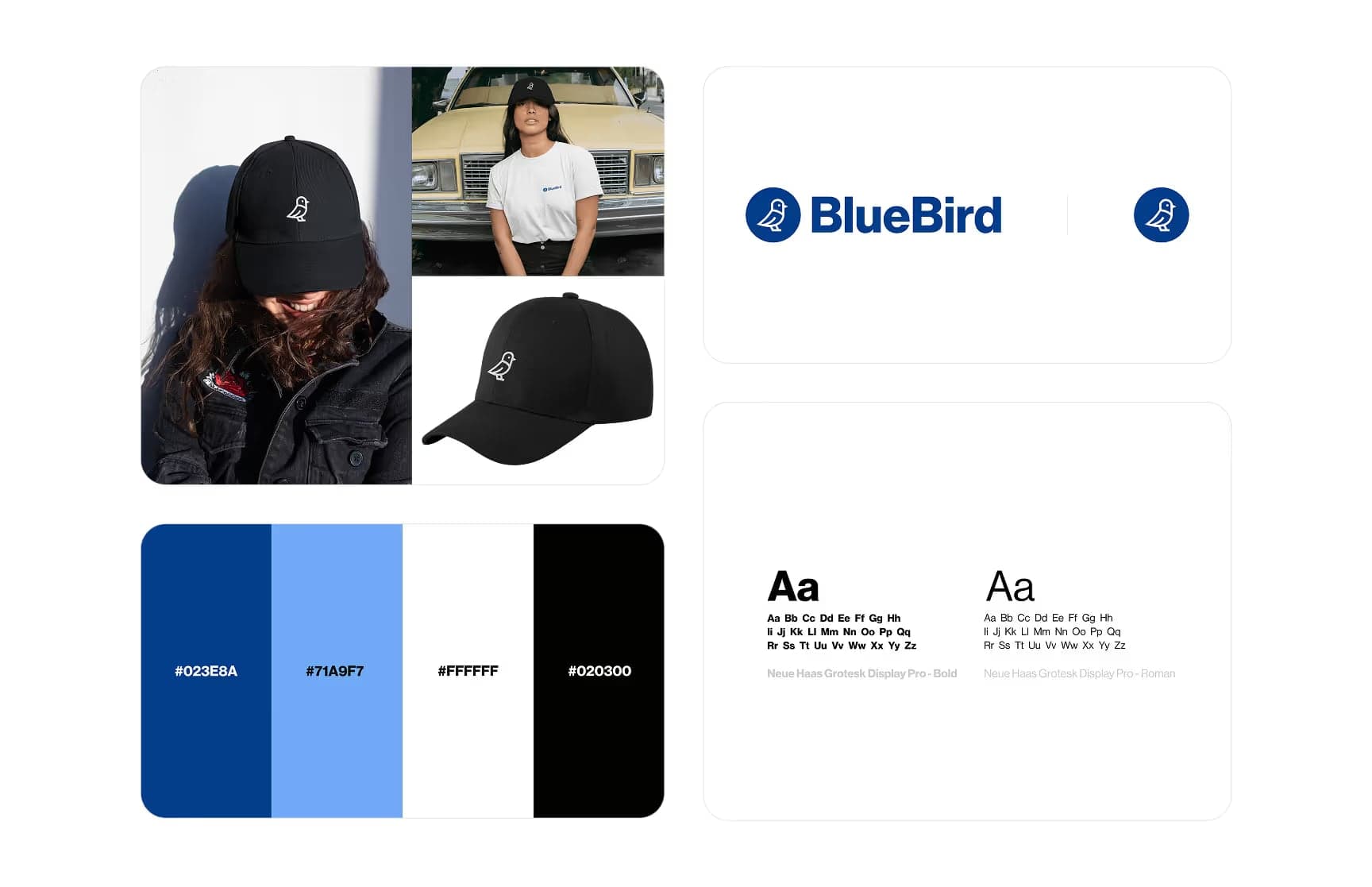
To ensure a realistic testing ground, I built a fully branded e-commerce experience for a sustainable fashion label named BlueBird. The brand was created for Max, a fictional persona representing a young, internet-savvy student who values quality, transparency, and ease of use when shopping online. Max became the lens through which I evaluated usability and flow across both platforms.
From typography and color palette to logo and tone of voice, every element of the brand was designed to reflect its audience. The visual identity used Neue Haas Grotesk Display for clarity and digital legibility, while PlaceIt mockups gave each product (a t-shirt, hoodie, cap, and tote bag) a consistent, high-quality look across both shops.
UX Process
I began the UX process in Figma, where I designed every screen of the BlueBird online shop from scratch. The homepage included a bold hero section, product slider, newsletter signup, and blog preview to drive engagement. I then designed a product overview with filtering and sorting options, a detailed product page with variant selectors and FAQs, and a multi-step checkout flow that focused on clarity and reassurance.
Once the high-fidelity prototype was complete, I conducted an expert review with a senior UX designer from the agency TEAM23 in Augsburg. Their feedback helped me refine several key aspects of the experience: improving accessibility through stronger contrast, simplifying navigation in the checkout, and enhancing clarity with a breadcrumb system and clearer form structure.
Development & Implementation
Webflow
In Webflow, I used the Designer environment and the Relume Webflow Library to bring the BlueBird shop to life. I found the design fidelity to be incredibly high. I was able to match my Figma layouts almost pixel for pixel. The WYSIWYG editor made layout adjustments quick and visual, and the platform allowed me to insert custom code where needed without friction. The code export feature was another bonus, offering a way out of the Webflow ecosystem without vendor lock-in.
However, Webflow wasn't without its limitations. There's no built-in test mode for checkout flows, which made realistic testing difficult. It also imposes caps on e-commerce and CMS items, and its native support for marketing (email, social media) is minimal without third-party tools.
Shopify
Building the same shop in Shopify offered a very different experience. I used the Dawn theme as my foundation and customized it using Shopify's theme editor and Liquid code. While visual flexibility was more limited, the platform excelled in shop management and scalability. It supported a wider range of payment methods, offered a built-in test mode for the checkout process, and included a native mobile app for managing orders.
Customization, however, came at a cost. The rigidity of the theme structure made it difficult to replicate the exact design, and many visual details required CSS changes. For designers without coding experience, even simple changes can become a challenge.
Feature Comparison
When comparing the two tools, Webflow clearly offered more freedom in visual and structural design, while Shopify delivered superior e-commerce functionality. Shopify supports test modes, extensive payment options, and built-in marketing tools, but at the expense of visual control. Webflow, meanwhile, gave me room to create a bespoke experience but lacked deeper e-commerce and scalability features.
Conclusion & Recommendations
This project confirmed that there's no single best tool, only the best fit for a given goal. Webflow is ideal for designers who want full creative control and are willing to trade off some functionality for visual precision. Shopify is better suited for businesses focused on robust commerce, scaling, and marketing from day one, especially if they're comfortable with working within a template system.
Both tools show the promise of Low-/No-Code approaches. But they also reveal the boundaries, especially when projects demand more flexibility, integration, or customization.
What I Learned
This was one of the most hands-on, insightful projects I've worked on. Designing for a real use case allowed me to uncover challenges that theory could never predict. I also realized that limitations in Low-/No-Code tools aren't just technical. They directly shape design outcomes and require workarounds or compromises.
Working across platforms made me a more adaptable product thinker, and collaborating with an expert reviewer helped me refine my design process in meaningful ways. It reinforced the value of user-centered design, even when the user is hypothetical, and reminded me that great UX comes from iteration, feedback, and real-world constraints.
Related service: Webflow development